- Rust 78.4%
- Kotlin 9.3%
- Shell 9%
- TypeScript 3%
- Java 0.2%
- Other 0.1%
 Albert Armea
74674f9a5a
Albert Armea
74674f9a5a
All checks were successful
CI / Version harmony (push) Successful in 12s
CI / Arch neutrality (push) Successful in 11s
CI / ShellCheck (push) Successful in 16s
CI / CI image (push) Successful in 22s
CI / CI image (Android) (push) Successful in 21s
CI / CI images (push) Successful in 0s
CI / Rustfmt (push) Successful in 24s
CI / Warm cargo registry (push) Successful in 27s
CI / Android media (cargo-ndk build) (push) Successful in 52s
CI / Android companion (unit tests) (push) Successful in 2m11s
CI / Clippy (push) Successful in 1m29s
CI / Build (push) Successful in 3m22s
CI / Firewall E2E (push) Successful in 4m4s
CI / Test (push) Successful in 3m49s
CI / E2E (push) Successful in 3m31s
CI / Package (.deb smoke build) (push) Successful in 2m53s
Reviewed-on: #134 |
||
|---|---|---|
| .ci | ||
| .claude/skills | ||
| .github/workflows | ||
| companion-android | ||
| crates | ||
| dist | ||
| docs | ||
| scripts | ||
| shepherd-webui | ||
| .dockerignore | ||
| .gitignore | ||
| AGENTS.md | ||
| Cargo.lock | ||
| Cargo.toml | ||
| CLAUDE.md | ||
| clippy.toml | ||
| config.example.toml | ||
| CONTRIBUTING.md | ||
| LICENSE.md | ||
| movies-library.example.toml | ||
| README.md | ||
| run-dev | ||
| sway.conf | ||
| VERSION | ||
shepherd-launcher
A child-friendly, parent-guided desktop environment alternative for Wayland, allowing supervised access to applications and content that you define.
Its primary goal is to return control of child-focused computing to parents, not software or hardware vendors, by providing:
- the ease-of-use of game consoles
- access to any application that can be run, emulated, or virtualized in desktop Linux
- with granular access controls inspired by and exceeding those in iOS Screen Time
While this repository provides some examples for existing software packages
(including non-free software and abandonware), shepherd-launcher is
non-prescriptive: as the end user, you are free to use them, not use them,
or write your own.
Screenshots
Home screen
shepherd-launcher presents a list of activities for the user to pick from.

The flow of manually opening and closing activities should be familiar.
Activities can be made selectively available at certain times of day.

This example, shown at 9 PM, has limited activities as a result.
Time limits
Activities can have configurable time limits, including:
- individual session length
- total usage per day
- cooldown periods before that particular activity can be restarted (skipped when the activity only ran for a moment, so a crash on launch costs nothing)
Anything on Linux
If it can run on Linux in any way, shape, or form, it can be supervised by
shepherd-launcher.
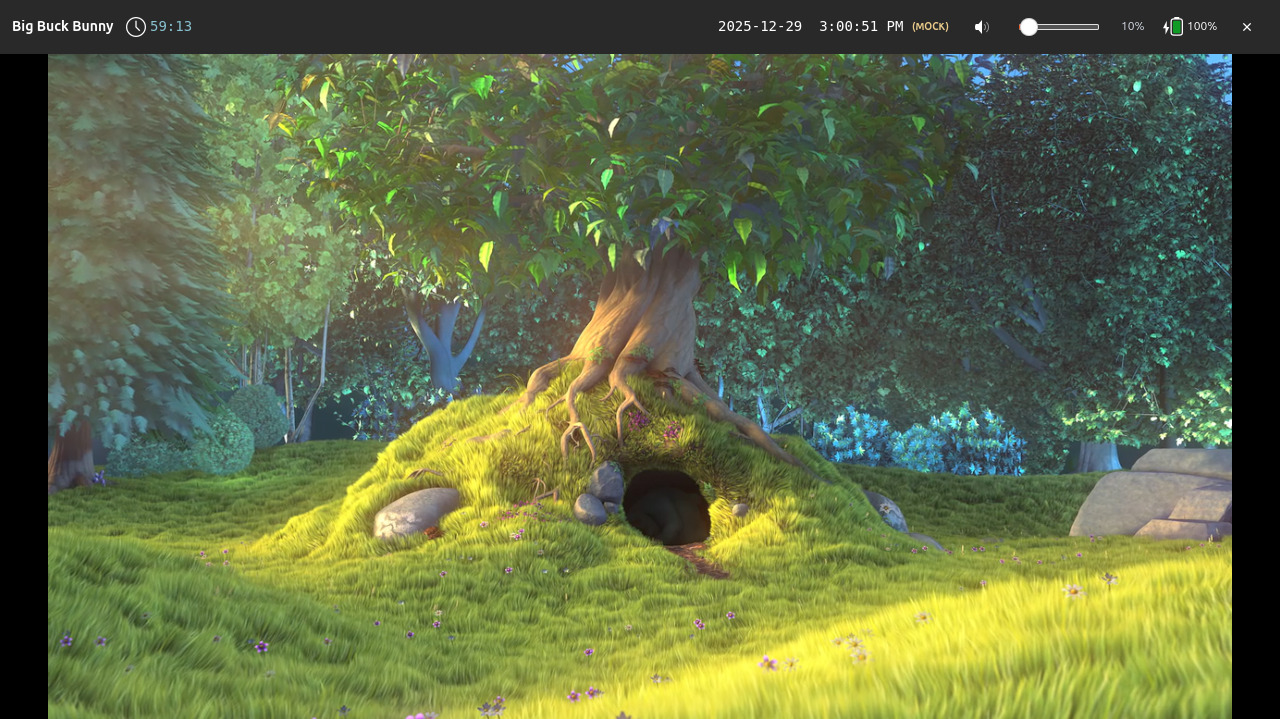
Big Buck Bunny playing locally via
mpv
For collections of media files (local or YouTube), the bundled
shepherd-media launcher reads a declarative
.toml library file and presents either a single direct-play activity or a
browseable poster grid.

Putt Putt Joins the Circus running via ScummVM

The Secret of Monkey Island running via ScummVM
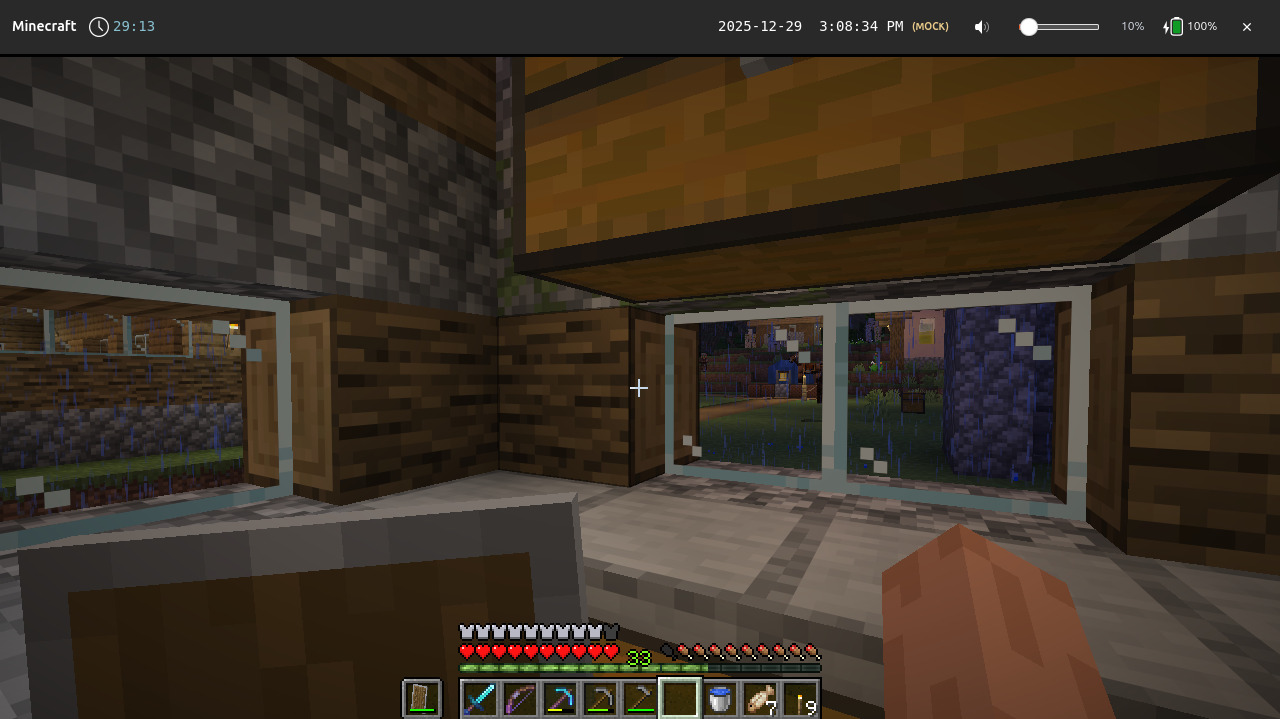
Minecraft running via the Prism Launcher Flatpak

Celeste running via Steam

A Short Hike running via Steam
Local management
shepherd-launcher optionally runs a management UI and API that can be used to
apply temporary overrides.


Core concepts
- Launcher-first: only one foreground activity at a time
- Time-scoped execution: applications are granted time slices, not unlimited sessions
- Parent-defined policy: rules live outside the application being run
- Wrappers, not patches: existing software is sandboxed, not modified
- Revocable access: sessions end predictably and enforceably
Non-goals
- Modifying or patching third-party applications
- Circumventing DRM or platform protections
- Replacing parental involvement with automation or third-party content moderation
- Remotely monitoring users with telemetry
- Collecting, storing, or reporting personally identifying information (PII)
Regarding age verification
shepherd-launcher may be considered "operating system software" under the
Digital Age Assurance Act and similar legislation,
and therefore subject to an age verification requirement.
As legislated, such requirements are fundamentally incompatible with non-goals 3, 4, and 5.
shepherd-launcher will never collect telemetry or PII, and as such, it will never implement this type of age verification.
As a result, shepherd-launcher is not licensed for use in any region that requires OS-level age verification by law.
If you reside in any such region, you may not download, install, or redistribute shepherd-launcher.
This includes, but is not limited to:
The US as a whole and individual states are considering similar legislation.
If you disagree with this assessment and you reside in an affected region, please contact your representatives.
Installation
shepherd-launcher is pre-alpha and in active development. The helper at
./scripts/shepherd can be used to build and install a fully functional
local kiosk setup from source:
Check out this repository and run ./scripts/shepherd --help or see
INSTALL.md for more.
Example configuration
All behavior shown above is driven entirely by declarative configuration.
For the Minecraft example shown above:
# Prism Launcher - Minecraft launcher (Flatpak)
# Install: flatpak install flathub org.prismlauncher.PrismLauncher
[[entries]]
id = "prism-launcher"
label = "Prism Launcher"
icon = "org.prismlauncher.PrismLauncher"

[entries.kind]
type = "flatpak"
app_id = "org.prismlauncher.PrismLauncher"

[entries.availability]
[[entries.availability.windows]]
days = "weekdays"
start = "15:00"
end = "18:00"

[[entries.availability.windows]]
days = "weekends"
start = "10:00"
end = "20:00"

[entries.limits]
max_run_seconds = 1800  # 30 minutes (roughly 3 in-game days)
daily_quota_seconds = 3600  # 1 hour per day
cooldown_seconds = 600  # 10 minute cooldown

[[entries.warnings]]
seconds_before = 120
severity = "warn"
message = "2 minutes remaining - save your game!"

[[entries.warnings]]
seconds_before = 30
severity = "critical"
message = "30 seconds! Save NOW!"
See config.example.toml and the Wiki for more.
Development
Build instructions and contribution guidelines are described in CONTRIBUTING.md.
If you'd like to help out, you can find potential work items on the Issues page. You may email me patch sets at shepherd-launcher-patch@albertarmea.com.
Written in 2025, responsibly
This project stands on the shoulders of giants in systems software and compatibility infrastructure:
- Wayland and Sway
- Rust
- Flatpak and Snap
- Proton and WINE
This project was written with the assistance of generative AI-based coding agents. Substantial prompts and design docs provided to agents are disclosed in docs/ai.